
One room sensor. Eight sensors. 15 measurements.
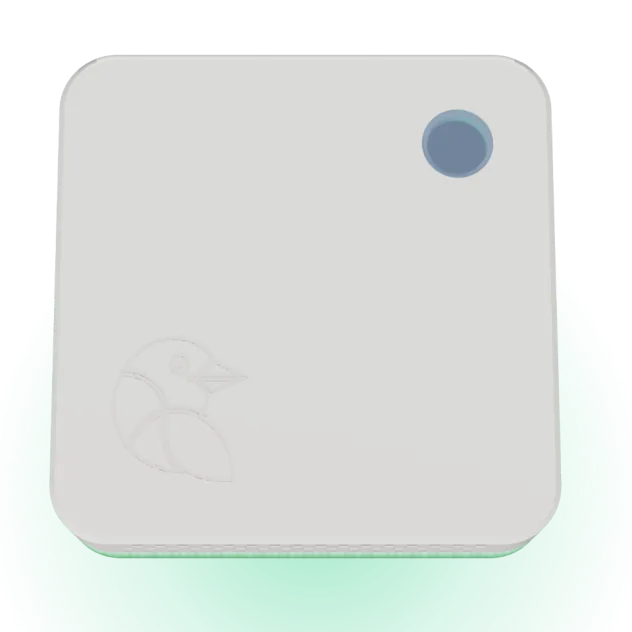
PitCanary is a room sensor for offices, meeting rooms and home offices: one 69 mm tile with eight sensors that measures 15 things every minute. It reads air quality, temperature, humidity, light, sound and presence, and shows its own Room score as a colour, with or without the internet. It costs €149 excl. VAT, once, and the dashboard is free for one PitCanary.
171 worked out: the kinds of moment and condition PitCanary recognises in a room's day from its readings, each judged for the kind of room it is.
Where is PitCanary designed and hosted?
PitCanary is designed in Groningen, the Netherlands, by Ninble B.V., and its data is stored in the EU, on infrastructure in Finland operated by a German company. It needs one plug, no app and no hub. It works out of the box and blends into the room.
A European product
Designed and shipped from inside the European Union, with your readings stored there too, under European law.
Designed and shipped
From the Netherlands. A minimal housing, one light, nothing to press in daily use. Sent by letterbox post in the Netherlands, Belgium, France, Sweden and Finland.
Hosted
On infrastructure in Finland operated by a German company. Your data is kept there, under European law.
What sensors are inside a PitCanary?
A PitCanary has eight sensors on one board: climate, CO₂, gas, light and flicker, colour, vibration, presence and a microphone. Together they do the work of a CO₂ monitor, a hygrometer, a lux meter, a sound level meter and an occupancy sensor. Each sensor reports every minute, so the room has one log instead of five meters.
Climate sensor
Temperature, humidity and air pressure from one chip, logged every minute like a temperature data logger and a hygrometer. The pressure trend is what sees a storm coming.
CO₂ sensor
Photoacoustic: it listens to how CO₂ absorbs a pulse of infrared light. It is the CO₂ monitor of the room.
Gas sensor
A heated metal-oxide surface that reacts to volatile organic compounds and nitrogen oxides. Reported as a VOC index and a NOx index, not concentrations, on the air quality page.
Light and flicker sensor
Light level in lux, UV, and flicker at the rates the eye does not see but the head does. It works as a lux meter that never stops reading.
Colour sensor
The colour of the light: daylight or lamp, warm or cold, and how much of it is blue. It tells a sunny window from a lit office.
Vibration sensor
Vibration, footsteps, shocks, and whether the device has been moved or tilted since it was placed. It feels the building's vibration as well as the desk.
Radar presence sensor
The radar notices a person breathing in a chair, so it works as an occupancy sensor. It cannot see who, and it does not count how many.
Microphone
Sound levels in dBA and the spectrum, like a sound level meter. It tells quiet, conversations, music, human sounds, work, appliances and surroundings apart on the device. No audio is recorded or sent.
Every minute those eight become one post, and the post becomes one number for the room.
How it becomes one Room scorePitCanary specification
A PitCanary measures 69 × 69 × about 25 mm, weighs 84 g and runs on USB-C at 1 W, with no battery. It posts its readings over 2.4 GHz Wi-Fi every 60 seconds, about 8 KB per post.
- Dimensions
- 69 × 69 × about 25 mm, corners with an 8 mm radius
- Weight
- 84 g
- Power
- USB-C, 1 W, no battery
- Connectivity
- Wi-Fi 2.4 GHz
- Post interval
- Every 60 seconds
- Post size
- About 8 KB
- Sensors
- 8: climate, CO₂ (photoacoustic), gas (VOC and NOx), light and flicker, colour, accelerometer, radar presence, microphone What a device measures exactly depends on its firmware version and its privacy settings. Firmware updates itself.
- Measurements
- 15
- Light
- Breathing halo through a light window, four modes, adjustable brightness; its colour is the Room score
- Materials
- White upper body, clear lower body and window, steel ring, two rows of vents so air reaches the sensors, four silicone pads 8 × 2.5 mm
- Updates
- Over the air, by itself: no app, no cable, no visit. Signed, so the device installs only an image it can verify. If an update fails it rolls back to the version that worked. Security updates are free for every PitCanary, with or without a subscription.
- Data
- Stored in the EU; export, API, MCP
- Shipping
- Letterbox in NL, BE, FR, SE, FI; Germany from 2027; parcel elsewhere
- In the box
- One PitCanary. A short USB-C cable. No power adapter.
- Made by
- Ninble B.V., Groningen
- Certification
- CE process under way
How do you install a PitCanary?
You install a PitCanary in a few minutes: plug it into USB-C, connect your phone to its setup network, give it your Wi-Fi and enter its pairing code on the dashboard. It needs no tools, no app, and no account to see the light work.
After that it posts once a minute, about 8 KB, so your network hardly notices.
- About 8 KB
- per post
- No app
- Android or iPhone
Plug it in
USB-C into a socket. The light comes on and the device starts measuring straight away.
Connect your phone
Android or iPhone. Join the device’s own Wi-Fi network and its setup page opens by itself.
Give it your Wi-Fi
Choose your network on that page and type the password. The page shows a pairing code.
That’s it
Enter the code on the dashboard. The first readings arrive within a minute.
What do the buttons on the underside do?
RESET restarts the PitCanary, and BOOT held for 10 seconds clears its Wi-Fi and settings. Both small buttons sit behind their own hole on the underside. A paperclip reaches both. You need neither in daily use.
Restart
Press RESET once to restart the PitCanary. Its Wi-Fi, pairing and settings stay as they are. It is back online within about 20 seconds.
Factory reset
Hold BOOT for 10 seconds. The light blinks red after 2 seconds, then turns solid red: Wi-Fi and settings are cleared. Let go earlier and nothing happens. It stays in your account and its room.
From the dashboard
Both work from the PitCanary's settings page too. A factory reset there also removes it from your account. Hold BOOT while plugging in to wait for a firmware update.
What does a PitCanary measure about people?
A PitCanary measures whether a room is in use, never who is in it or how many. It records no audio, and each sensor that could pick up more has a switch that is yours. So is the data, stored in the EU, in Finland, under European law. You read it through the dashboard, an export, the API, the MCP server, Home Assistant over MQTT and a local API. See all integrations.
PitCanary is made by Ninble B.V., a European company in Groningen.
- Microphone
Measures levels and a spectrum, and tells quiet, conversations, music, human sounds, work, appliances and surroundings apart on the device itself. No audio is recorded or sent in any setting.
- Presence radar
Tells whether the room is in use, as a shade from empty to busy. Never who, never how many.
- Bluetooth scan Sends device addresses when on
When on, the device sends the addresses of Bluetooth devices it hears to the server. Off means it does not.
- Wi-Fi scan Sends network addresses when on
Same rule: on sends the network addresses it sees, off sends nothing.
Eight sensors.
One small tile.
Put it in the room people complain about and plug it in. The first readings arrive within a minute. The dashboard for your first room is free.